
What if the displayed code is correct, but the diagnosis is still wrong? An appliance fault code database can provide a useful lead, but the same code may mean different things on different brands and models. A code can point to a system or condition without proving that a specific component has failed.
Before sourcing a part, check the appliance’s exact brand and model. Then compare the lookup result with the manual or technical sheet and the symptoms you can observe.
This article explains how to find a model-specific entry in an appliance fault code database, verify its meaning, and interpret possible component listings without treating them as a confirmed diagnosis. CodeFix is an independent online reference platform, with entries that connect code meanings to possible faulty parts and practical repair considerations. You’ll also learn how to choose a safe next diagnostic step before sourcing a component or deciding whether to repair the appliance.
Key Takeaways
- Match the displayed code to the appliance’s exact brand and model before relying on a lookup result.
- Search the appliance fault code database using the precise code format, including letters, zeros, and punctuation.
- Distinguish the system indicated by a code from its possible causes. A component listing does not confirm that the part has failed.
- Compare the entry with the appliance manual and observed symptoms before choosing a diagnostic step.
- Use CodeFix entries to review code meanings and repair considerations, then verify details before sourcing a component.
Appliance Fault Code Database: What It Is and What a Lookup Can Tell You
An appliance fault code database is a searchable reference that connects a displayed code with diagnostic information for a specific brand, model, or product family. It may cover espresso machines, dishwashers, dryers, and ovens. An entry can describe the system reporting a fault, likely causes, and components to investigate.
Appliances use electronic controls to detect and report certain operating conditions. The broad idea is similar to a power-on self-test (POST), in which a device checks for faults and reports results. Appliance code behavior varies by design, so always match a code to the correct model before interpreting it.
Quotable definition: A fault code indicates a condition detected by an appliance’s control system; it does not, by itself, diagnose a failed component.
Which appliance details do you need before searching?
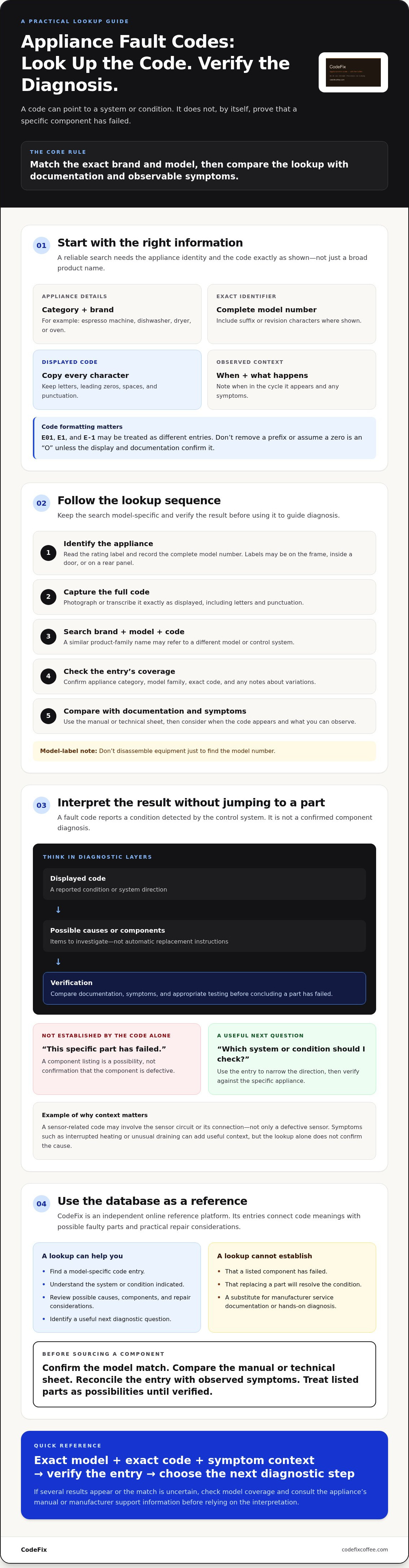
Before searching an appliance fault code database, record the brand, complete model number, and exact displayed code. The model label may be on the appliance frame, inside a door, or on a rear panel. Note where the code appears, when it appears during the cycle, and any symptoms, such as interrupted heating or unusual draining. Similar product names can cover different control systems, so a code’s interpretation may vary by model or product family.
What a database entry can and cannot establish
An entry can narrow the diagnostic direction by connecting a code to a system, likely causes, or possible components. A sensor-related code, for example, may involve the sensor circuit or its connection, not just a defective sensor. Treat listed parts as possibilities, not instructions to replace them. Symptom checks and appropriate testing are needed to confirm a component fault.
Database guidance is a reference, not manufacturer service documentation or a hands-on diagnosis. Consult the manual or technical sheet for model-specific procedures and limits. A lookup can help identify the next diagnostic question, but it cannot establish that a part has failed or that replacing it will resolve the condition.
How to Search an Appliance Fault Code Database Accurately
Follow a consistent lookup sequence: identify the appliance, capture the code, search by brand and model, verify the entry, then compare it with the symptoms. Start with the rating label rather than a broad product name. A product family may include different control systems, so a result for a similar model may not apply.
Minimum information for a reliable lookup: appliance category, brand, complete model number, and exact displayed code. Record the code as shown, including letters, leading zeros, spaces, and punctuation. “E01,” “E1,” and “E-1” may be treated as different entries. Don’t remove a prefix or assume a zero is an “O” unless the display and documentation confirm it.
- Identify the appliance and copy the full model number.
- Photograph or transcribe the complete code.
- Search using the brand, model, and code together.
- Check that the entry covers the appliance category and model family.
- Compare the code guidance with when it appears and the symptoms you observe.
How to find the appliance model number
Check the rating label and user manual for the complete model identifier, including any suffix or revision characters. The product-family name on a control panel or sales listing may not identify the specific model. Record or photograph the label before moving the appliance or removing any panels. Don’t disassemble equipment just to find the model number.
How to verify a result when several entries appear
Compare each result by brand, appliance category, model family, and exact code. Read the entry heading and model coverage, not just a matching code in a search snippet. Look for notes that distinguish similar codes or model-specific variations. If the match remains uncertain, consult the model’s manual or manufacturer support information before relying on the interpretation.
Database results can help when model-specific diagnostic information is difficult to locate. The Federal Trade Commission has discussed manufacturer limits on repair resources, including illegal repair restrictions. That context doesn’t verify a particular code. The model coverage and documentation still need to match. For a searchable reference across appliance categories, see the CodeFix appliance fault code database, then compare the result with the appliance’s own documentation.
How to Interpret a Fault Code Without Misidentifying the Failed Part
Read a code as a diagnostic direction, not a parts order. An appliance fault code database may identify a system the control board has detected as abnormal. That system can have several possible causes, so first confirm that the entry matches the exact model.
Code meaning versus probable cause versus confirmed failure
Code meaning is the condition or system associated with the display. A probable cause is one possible explanation, such as a failed sensor, damaged wiring, or a poor connection. A confirmed failure requires evidence from appropriate testing. Confidence increases when model-specific documentation, symptoms, and test results support the same diagnosis.
Use this distinction when reviewing an entry:
| Displayed code | Indicated system | Possible causes | Confirmation needed |
|---|---|---|---|
| Model-specific sensor code | Temperature sensing or its circuit | Sensor fault, loose connector, damaged wiring, or control input issue | Compare symptoms and model procedures; electrical testing may be required |
| Model-specific drainage code | Water removal or drain monitoring | Restricted flow, pump issue, hose problem, or sensing fault | Check accessible conditions in the manual; component diagnosis requires suitable tests |
These are diagnostic categories, not universal code mappings. A sensor-related code does not prove the sensor itself has failed. A circuit or connection problem can produce a similar indication. Don’t replace a component solely because it appears among the possible causes.
If references conflict, verify the details rather than guessing. Check the appliance category, model coverage, and code format against the manual or manufacturer documentation. The Federal Trade Commission’s Nixing the Fix report discusses access to repair information; it is not a code directory and cannot confirm a particular component failure.
How symptoms help narrow the diagnostic path
Record when the code appears, whether it clears or returns, and which appliance function is affected. Compare those observations with the database entry. If a code points to a drainage system and the appliance also retains water, that symptom may support investigating the drainage system. It still does not prove which part has failed.
Limit initial checks to safe observations and steps allowed by the user manual. Stop before tests involving exposed electrical connections, hot surfaces, pressure systems, or moving assemblies. Those checks require appropriate expertise and procedures.
What to Do After an Appliance Fault Code Lookup
A lookup narrows the diagnostic direction, but it doesn’t confirm the repair. Use the result to choose a controlled next step, not as a reason to open the appliance or order a part.
- Document the code. Record the exact display and note whether it stays on, clears, or returns.
- Consult the manual. Check the model-specific instructions for the code and any recommended user actions.
- Assess symptoms. Note which function stopped, when the issue began, and any visible changes, such as standing water or an interrupted cycle.
- Decide whether testing is appropriate. Limit self-checks to procedures the manual identifies as safe for users. Leave internal diagnosis to qualified service when it involves hazards or uncertain access.
A reset may be a limited check if the manual recommends it. If the code clears, record the result and monitor the appliance as directed. A cleared display doesn’t prove the underlying condition is resolved. If the code returns, seek diagnosis rather than repeating resets.
Which checks are appropriate before opening an appliance?
Start with accessible controls, visible conditions, and actions recommended in the manual. Don’t remove panels or perform energized internal testing based on a database result. Disconnect power when the manual requires it, and don’t assume unplugging makes every internal component safe to handle. Stop if a procedure is hazardous, inaccessible, or unclear, and seek qualified service.
Electrical measurements, thermal checks, pressure-system tests, and work near moving assemblies require suitable expertise and procedures. A fault code may point toward one of these systems, but it doesn’t make hands-on testing safe.
When should you stop troubleshooting and seek service?
Stop using the appliance if the code recurs or operation appears unsafe. Burning smells, leaks, abnormal heat, or unexpected movement are also reasons to stop. Follow the manual’s safety instructions, and don’t continue testing to see whether the symptom worsens.
Before contacting a technician or comparing repair options, collect the brand and full model number, exact code, when it appears, symptoms, whether a reset changed anything, and checks already completed. This record separates observed facts from assumptions and helps keep the discussion focused on diagnosis.
The CodeFix appliance fault code database is one reference for reviewing model-related code guidance and possible repair considerations.
Using the CodeFix Appliance Fault Code Database as a Diagnostic Reference
CodeFix organizes appliance code guidance across multiple types and brands, including espresso machines, dishwashers, dryers, and ovens. An entry may describe what a code indicates, list possible faulty parts, provide a repair-cost estimate, and discuss whether repair or replacement may be worth considering. Treat each item as reference information for that entry, not a confirmed diagnosis or guaranteed outcome.
CodeFix is an independent reference platform. It does not provide in-person appliance repair or sell replacement parts directly. The appliance fault code database can help structure your research, but model documentation and observed symptoms remain important checks.
How to use an entry to plan the next diagnostic step
Search by brand, complete model number, and exact displayed code. Check that the entry covers your appliance, then compare its stated symptoms with what you observed. If it lists a sensor, pump, valve, or control board as a possible faulty part, treat that component as a lead for further diagnosis, not an automatic purchase instruction.
Repair estimates and repair-versus-replacement guidance can help frame a decision, but they depend on the specific appliance and your circumstances. Confirm that the estimate applies to the entry you’re viewing. Consider the appliance’s condition and the diagnosis before treating a general repair assessment as a recommendation for your situation.
How component referrals and estimates should be understood
Some component links may refer readers to third-party merchants. CodeFix does not sell those parts directly, and a referral link does not confirm that a component is faulty or compatible. Review the site’s current affiliate disclosure where applicable. Before purchasing through any vendor, verify the part against the appliance’s complete model number and confirm the diagnosis.
Find the relevant appliance code entry
Enter the brand, model, and exact code, then check the entry’s model coverage and guidance. If the match or code meaning remains uncertain, compare it with the appliance manual or manufacturer information before choosing a diagnostic step.
Search the CodeFix appliance fault code database to find a relevant entry and review its diagnostic and repair considerations.
Use the Code as a Starting Point, Not a Parts Diagnosis
A reliable lookup starts with the appliance’s complete model number and the exact displayed code. Match both before interpreting an entry. Then compare the indicated system with the appliance’s symptoms and manual. A code can guide diagnosis, but it doesn’t prove that a listed component has failed.
An appliance fault code database is most useful when its result helps identify a safe next step. CodeFix provides a searchable reference across appliance categories and major brands, with entries connecting code meanings to possible parts and repair considerations. It’s an independent platform, not a repair service or direct parts seller. Parts referrals may lead to third-party merchants, so confirm both the diagnosis and compatibility before purchasing.
Use the reference to organize what you know, document the appliance’s behavior, and decide whether further checks are appropriate. To find a model-specific entry, search the CodeFix appliance fault code database. Match the model carefully and treat the result as a diagnostic lead, not a parts diagnosis.
Frequently Asked Questions
What is an appliance fault code database?
An appliance fault code database is a searchable reference that connects displayed codes with diagnostic information for appliance brands and models. Entries may explain the system or condition associated with a code, list possible causes or components, and provide practical repair considerations. CodeFix covers categories such as espresso machines, dishwashers, dryers, and ovens. Use an entry as a diagnostic reference, then check its model coverage against the appliance documentation.
Can the same appliance error code mean different things on different models?
Yes. A code’s meaning can vary by brand, appliance category, and model or product family. The same characters may refer to different detected conditions on different appliances. Search using the brand, complete model number, and exact code, including letters and leading zeros. If several entries appear or the meaning conflicts with the manual, don’t guess. Verify the match with model-specific documentation or manufacturer support information.
How do I find my appliance model number for a fault code lookup?
Check the appliance’s rating label and user manual for its complete model identifier. Depending on the appliance, the label may be on the frame, inside a door, or on a rear panel. Record any suffixes or revision characters, not just the product-family name. Photograph the label before moving the appliance or removing panels. Use the complete identifier when searching so you can distinguish similar models.
What should I do if my appliance fault code is not in the database?
Recheck the code exactly as displayed, including punctuation, letters, and leading zeros, then confirm the brand and complete model number. Search the appliance manual or manufacturer support information for a model-specific explanation. Record when the code appears and which function is affected. If the meaning remains unclear, don’t select a similar code as a substitute. A qualified technician can assess the symptoms and perform appropriate tests.
Does an appliance fault code identify the part that needs replacing?
No. A fault code generally indicates a detected condition or system, not a confirmed failed component. For example, a sensor-related code may involve the sensor, its wiring, a connector, or the control circuit. Treat parts listed in a database entry as possible causes. Compare the guidance with symptoms and model-specific procedures, then confirm the fault through suitable testing before replacing a component.
Is it safe to reset an appliance after a fault code appears?
Reset the appliance only if the user manual recommends that action and explains how to do it safely. A reset may clear the display temporarily, but that doesn’t establish that the underlying fault is resolved. Note whether the code returns and what the appliance was doing when it reappeared. Stop using it if you notice a burning smell, a leak, abnormal heat, or unsafe operation.
Can I use a fault code database to diagnose an appliance myself?
You can use a fault code database to identify the likely system involved, compare the entry with symptoms, and plan safe next steps. It doesn’t replace manufacturer documentation or confirm a failed part. Limit self-checks to visible conditions, accessible controls, and actions recommended in the manual. Electrical, thermal, pressure, or moving-part tests may require expertise. Stop if access or procedure is hazardous, uncertain, or outside the manual’s user guidance.